
Knowing your exam board is essential. It ensures you’re using the right resources, the right past papers, and learning the right course content. Here are the simplest ways to find out.
1. Ask your teacher
The quickest option is to ask your subject teacher directly. They’ll know exactly which exam board you’re studying and can often share the specification code or a link to the course.
Try asking:
- “Which exam board are we using for [subject]?”
- “What’s the specification code for our course?”
If you’re not in class, send a quick message or email; teachers are used to these questions.
2. Check your school’s online platform
Most schools use platforms like:
- Google Classroom
- Microsoft Teams
- Satchel One / Show My Homework
Look through your subject folders for filenames such as “AQA GCSE Biology Paper 1” or “Edexcel Maths Past Papers.”
Course resources, assignment titles, or document headers often show the exam board clearly.
3. Look at past papers or revision booklets
If you’ve been given mock papers or revision packs, the exam board is usually written on the front page.
You might see labels like:
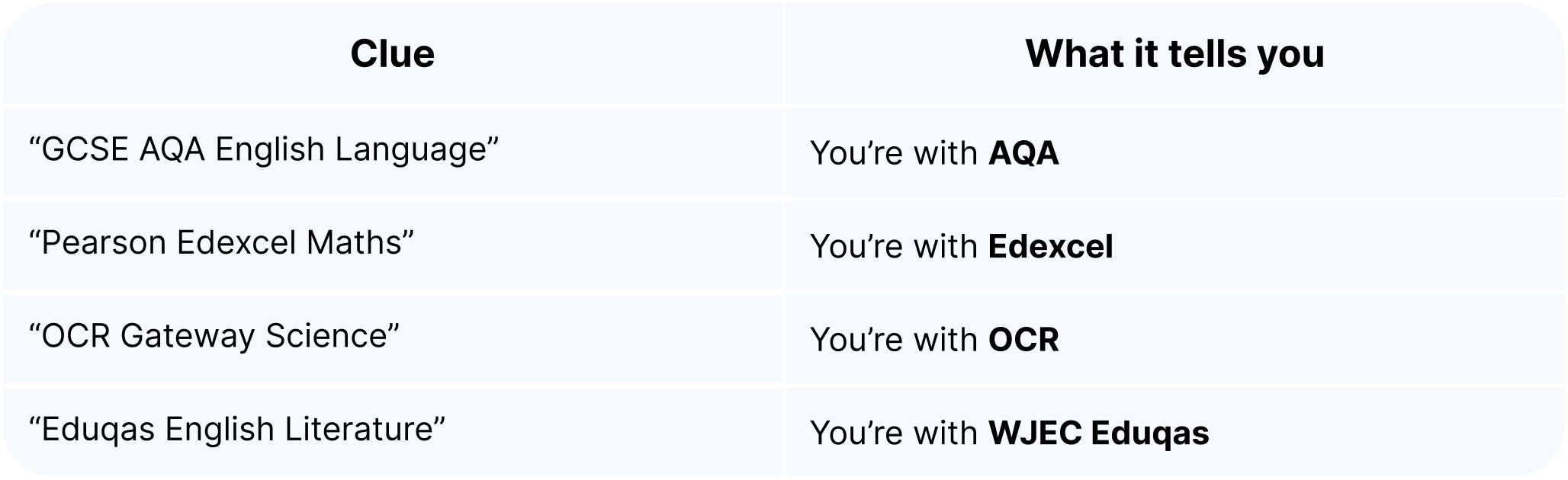
If you spot a specification code, search for it online to go straight to the right exam board’s website.
4. Ask your exams officer
Every school has an exams officer who manages GCSE entries. They can confirm which board you’re with for each subject and may be able to share your Statement of Entry too.
If you’re not sure who the exams officer is, check with your form tutor or school reception.