
Your Track page shows how you’re doing across each GCSE subject. It has two main measures: health scores, which show how you’re doing in each topic, and predicted grades, which estimate the grade you might get in your GCSEs.
How do I get to my progress data?
- Log in to your Atom account
- If you're a parent with more than one child on Atom, click into the profile of the child you’d like to view
- Click Track
Where can I find my completed work?
- On the Track page, click into the subject you’d like to review
- Click the 'completed work' tab
- Open any piece of marked work, including topic practice and past papers, to see your tailored feedback
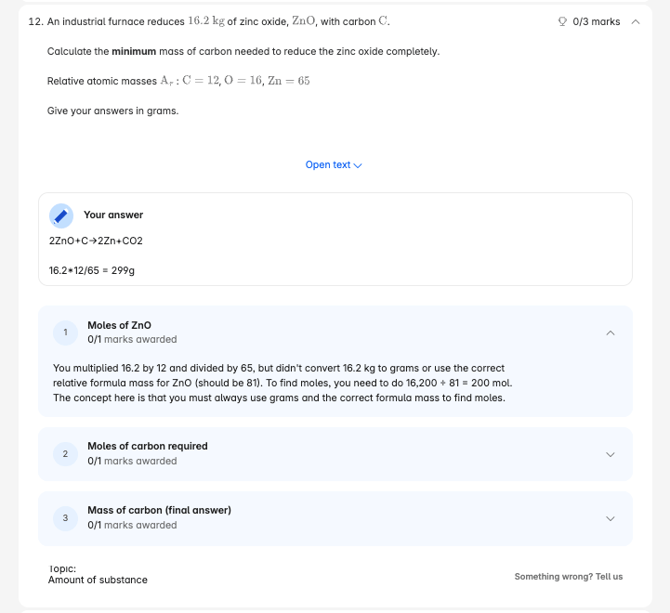
For each question, you can see which topic it was on. After each mock, you can use this to pick two or three topics to practise, so you can close any knowledge gaps.
What is a predicted grade?
A predicted grade is our current estimate of the GCSE grade you might get in a subject when you sit your exams. It’s based on how you’re doing in your practice questions and, if you’re on the Exam Prep Plus plan, your mock results. This is a live estimate of where you are.
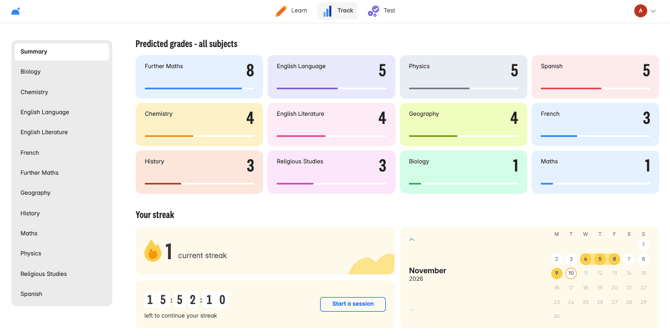
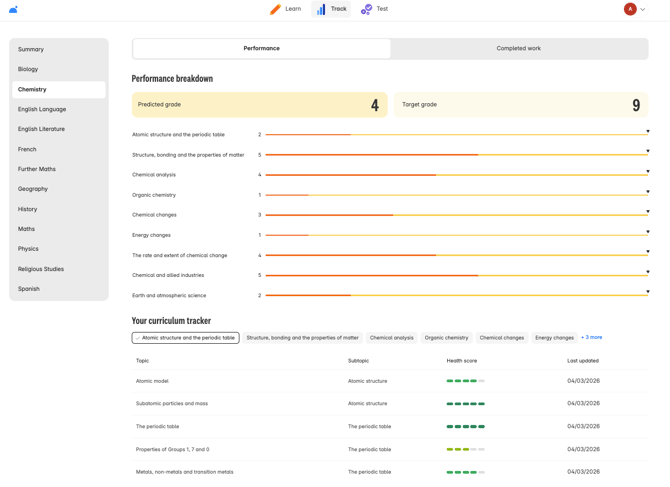
To see more detail, click into a subject on the left-hand side of the Track page. You’ll see your predicted grade broken down by subtopic, along with our confidence level. This shows how sure we are that you would achieve that grade when you sit your GCSEs. The more work you complete on Atom, the more confident we are.
What is a health score?
Below your predicted grades, you can see your performance in each topic. Once you’ve completed work in a topic, you get a health score, which shows how confident you are with it. It’s based on your most recent 10 - 20 questions. If you don’t practise a topic for a while, its health score slowly drops, and it recovers as soon as you answer more questions. Using your health scores to build a revision routine will build into your subtopic predicted grades and your overall grade for that subject.
How should I use them together?
Health scores and predicted grades answer two different questions. Health scores tell you what to work on next, and predicted grades tell you how you’re doing overall. Using them together helps you spend your time where it makes the most difference.
Suggested weekly routine
- Check your predicted grades. Start on the Track page and click into the subject you’re working on to see where you are right now.
- Find your weakest topics. Scroll down to your topic health scores and pick out two or three with the lowest scores.
- Practice those topics. Allocate time in your revision planner to complete a set of exam-style questions in each one. Remember, your health score is based on your most recent 10 to 20 questions.
- Review your marked work. Open the 'completed work' tab and read the feedback on any questions you found hard.
- Check back after a few days. Your scores update regularly, so you can see whether your practice is making a difference.
Top tips:
If you see a low health score in a topic
What it means: your recent answers in that topic have been tricky.
Try: read the feedback in your completed work, then practice it again.
If you see a health score that has dropped
What it means: you haven’t practised the topic for a while, so the score has faded.
Try: answer a few questions to bring it back up.
If your predicted grade hasn’t moved
What it means: it reflects your overall performance, so it changes gradually.
Try: keep practising across several topics, not just one.
If your confidence level is low
What it means: we don’t have enough of your work yet to be sure of the grade.
Try: complete more practice.
If you’ve just finished a mock
What it means: it shows how you perform under exam conditions.
Try: use the transcript to pick two or three topics to practice, then check their health scores.